Understanding MCP: The Protocol Changing AI Integration
Ronnie Miller
August 14, 2025
Every AI integration used to be a custom job. You wanted your AI agent to query a database? Custom code. Read from Slack? Different custom code. Pull from GitHub? Yet another integration. For M applications connecting to N data sources, you needed M×N custom integrations.
It was the same problem the software industry solved decades ago with standardized protocols. USB replaced a dozen proprietary connectors. HTTP gave us one way to request web pages. SMTP gave us one way to send email.
MCP (Model Context Protocol) is that standardization moment for AI.
Anthropic released it in November 2024. In the months since, it's been adopted by OpenAI, Google, Microsoft, and most major AI tools. I want to give you a straight picture of what it actually is, how it works, and whether you should care.
Short answer: you should.
The Problem MCP Solves
Here's the math that makes MCP matter.
Say you have 5 AI applications: Claude, ChatGPT, Cursor, a custom internal agent, and a coding assistant. And you want each of them to talk to 10 data sources: GitHub, Postgres, Slack, Jira, your filesystem, Google Drive, a CRM, an internal API, S3, and a monitoring tool.
Without a standard protocol, every combination needs its own custom connector. That's 5 × 10 = 50 custom integrations. Each one built, tested, and maintained separately. Each one slightly different. Each one a liability when something changes on either side.
With MCP, each AI application implements the MCP client once. Each data source implements an MCP server once. Now it's 5 + 10 = 15 total implementations. Any client talks to any server. The combinatorial explosion is gone.
If you're an engineering leader, here's the analogy that will land immediately: MCP is to AI tools what LSP is to code editors.
Before the Language Server Protocol, every editor needed its own language support for every programming language. VS Code needed its own Go support. Vim needed its own Go support. Sublime needed its own Go support. N editors times M languages, all maintained separately.
LSP fixed that. Build one language server for Go, and every LSP-compatible editor gets Go support for free. Build one editor with LSP support, and it works with every language server.
MCP does exactly the same thing, but for AI applications connecting to external tools and data sources. Build one MCP server for Postgres, and every MCP-compatible AI tool can query your database. Build one MCP client into your AI app, and it can connect to every MCP server in the ecosystem.
How MCP Works (Without the PhD)
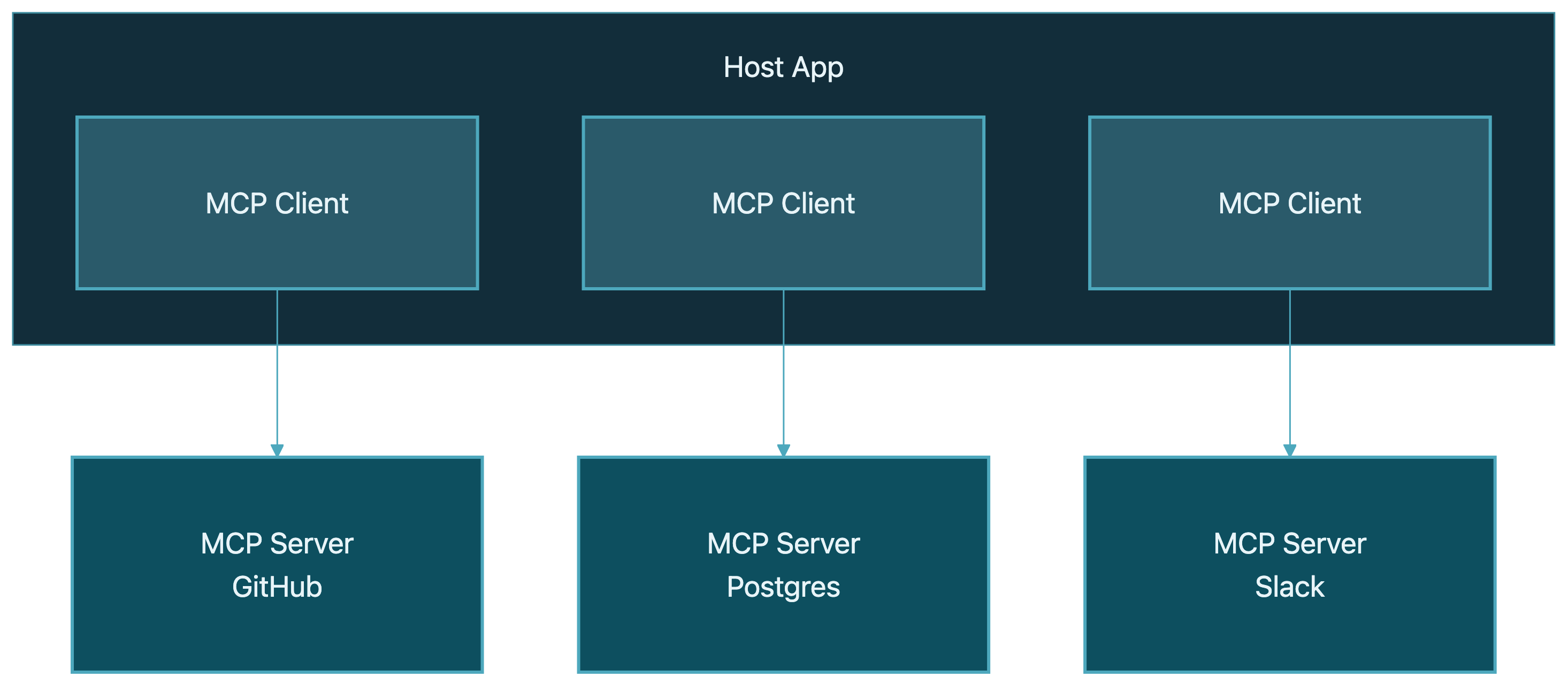
Here's how I explain MCP architecture to engineering teams. There are three roles:
- Host: The AI application your user is actually interacting with. Claude Desktop, ChatGPT, Cursor, your custom AI app. The host is what the user sees.
- Client: A protocol handler that lives inside the host. It manages the connection to MCP servers. One client connects to one server, but a host can run multiple clients. Think of it as the plumbing.
- Server: A lightweight program that wraps an external service and exposes it through MCP. There's an MCP server for GitHub, one for Postgres, one for Slack, and so on. This is the piece you'd build if you wanted to expose your own tool or data to AI agents.
The flow looks like this:
Each MCP server exposes capabilities through three primitives:
- Tools: Functions the AI can call. Think
query_database,create_issue,send_message. Tools are actions. The AI model decides when to call them based on the user's request. - Resources: Data the AI can read. File contents, database schemas, API documentation. Resources provide context that helps the AI do its job better.
- Prompts: Reusable templates that guide how the AI interacts with a particular server. Things like "summarize this repo" or "review this SQL query." Prompts are optional but useful for common workflows.
Under the hood, it's JSON-RPC 2.0, the same message format used by LSP and plenty of other protocols. Nothing exotic. The client sends a JSON request, the server sends a JSON response.
For transport, there are two options:
- STDIO: The server runs as a local process, and the client communicates through standard input/output. Fast, simple, no network involved. This is what you use for local dev tool integrations like filesystem access or running a local database.
- Streamable HTTP: The server runs remotely and communicates over HTTP with server-sent events (SSE) for streaming. This is what you use for remote services, shared servers, or anything you'd deploy to production.
That's really it. Host contains clients. Clients talk to servers. Servers expose tools, resources, and prompts. JSON-RPC messages over STDIO or HTTP. If you've worked with LSP, REST APIs, or any RPC protocol, none of this is conceptually new. The power isn't in the complexity. It's in the standardization.
Why This Matters for Your Team
I've worked with enough engineering teams wrestling with AI integrations to know where the pain is. Here's how MCP addresses it.
Standardization: Build Once, Connect Everywhere
Right now, if you build a Slack integration for one AI tool, you're starting from scratch for the next one. Different APIs, different auth flows, different data formats. MCP means you build that Slack server once, and it works with Claude, ChatGPT, Cursor, and any future AI tool that supports the protocol.
For teams maintaining multiple AI tools or transitioning between providers, this is a big deal. Your integrations aren't locked to a vendor anymore.
Composability: Mix and Match Capabilities
MCP servers are independent. You can give your AI agent access to GitHub + Postgres + Slack by connecting three MCP servers. Want to add Jira next week? Plug in one more server. No changes to your agent's core code. No redeployment of anything except the new server.
This is the pattern that makes agent systems maintainable. The agent's core logic stays clean. Capabilities come from MCP servers that you can add, remove, or swap without touching the agent itself.
Security: Controlled Access
MCP gives you a clear boundary between what the AI can and can't do. Each server defines its own tools and resources with explicit permissions. The AI can't access anything you haven't exposed through a server.
The protocol supports OAuth 2.1 for remote server authentication, and there's a human-in-the-loop consent model where the host can prompt the user before executing sensitive tool calls. You define the surface area. The AI operates within it.
A Real Ecosystem
This isn't a niche Anthropic project anymore. The numbers tell the story:
- 11,000+ community MCP servers listed in registries and directories
- Adopted by OpenAI, Google DeepMind, Microsoft, Amazon, and Apple
- Built into Cursor, Zed, VS Code, Windsurf, Cline, and most major AI-powered dev tools
- Official SDKs for Python, TypeScript, Java, Kotlin, C#, and Swift
When every major AI provider adopts the same protocol within a year, that's not a trend. That's a standard forming in real time.
Where MCP Is Today (Honest Assessment)
I'd be doing you a disservice if I only talked about the upside. MCP is powerful, but it's also less than a year old. Here's the honest picture.
What's Working Well
Developer tooling is the sweet spot. If you use Cursor, Zed, Claude Desktop, or VS Code with an AI extension, MCP is already there and working well. Connecting to GitHub, databases, file systems, and internal APIs through MCP feels natural and reliable.
The Python SDK (FastMCP) and TypeScript SDK are solid. Building a custom MCP server is straightforward, and I'll show you a snippet in a minute. The developer experience is genuinely good.
Local integrations via STDIO are fast and stable. For developer workflows where the server runs on your machine, this is production-ready today.
What's Not Ready
Enterprise security is the biggest gap. Research from Astrix Security found that 43% of MCP servers have prompt injection vulnerabilities. That's not an MCP protocol flaw; it's a server implementation maturity issue. But it means you need to vet MCP servers carefully before deploying them in any environment with real data.
Compliance for regulated industries (healthcare, finance, government) isn't there yet. Audit logging, fine-grained access controls, and compliance certifications are still early or missing. If you need SOC 2 or HIPAA compliance on your AI integrations, MCP alone won't get you there today.
Consumer UX needs work. For developers, connecting MCP servers is simple enough. For non-technical users, the "install and configure an MCP server" workflow is still too manual. This will improve, but it's a real limitation right now.
The Honest Take
MCP is production-ready for internal tools and developer workflows. I use it daily. My clients use it in their internal agent systems. It works.
It is not ready for customer-facing applications in regulated industries. Not because the protocol is flawed, but because the ecosystem around it (security hardening, compliance tooling, enterprise management) needs to catch up.
It's a year old. Give it time. But the direction is clear, and the momentum is undeniable. Building on MCP now means you're building on what's becoming the standard, not betting on a long shot.
Getting Started
You don't need to overhaul anything to start exploring MCP. Here's how I'd approach it depending on where you are.
If You're Already Using AI Dev Tools
If you use Claude Desktop, Cursor, or VS Code with Copilot, you already have an MCP client. You're closer than you think. Try connecting to a pre-built server:
- The filesystem server gives your AI tool access to read and write local files with controlled permissions
- The GitHub server lets your AI create issues, review PRs, and search repos
- The Postgres server lets your AI query your database with read-only or read-write access you define
Most of these take about five minutes to configure. It's the fastest way to understand what MCP feels like in practice.
If You're Building AI Tools
Look at the Python SDK (FastMCP) or the TypeScript SDK. A basic MCP server is surprisingly little code. Here's what a simple tool definition looks like in Python:
from fastmcp import FastMCP

mcp = FastMCP("My Server")

@mcp.tool()
def get_customer(customer_id: str) -> dict:
    """Look up a customer by their ID."""
    customer = db.find_customer(customer_id)
    return {"name": customer.name, "plan": customer.plan, "since": customer.created_at}
That's it. The @mcp.tool() decorator registers the function as an MCP tool. The docstring becomes the tool's description that the AI model sees. The type hints define the input schema. FastMCP handles the JSON-RPC protocol, the transport layer, and the capability negotiation.
You write a Python function. MCP makes it available to any compatible AI application. That's the whole idea.
In practice, this is how production agent integrations come together. You wrap existing services as MCP servers, compose them together, and give AI agents clean, controlled access to real business systems.
MCP isn't perfect. The security story needs work, the ecosystem is young, and enterprise features are still catching up. I've said that plainly because I think it matters more to give you an accurate picture than a rosy one.
But the trajectory is clear.
Every major AI provider has adopted it. The developer tooling is already good. The community is building servers faster than anyone predicted. The fragmented, bespoke integration era for AI is ending, and MCP is why.
If you're building AI systems that need to talk to the real world (databases, APIs, internal tools, third-party services), this is the protocol to bet on. Not because it's finished, but because it's clearly becoming the standard, and the cost of building on it now is low while the cost of ignoring it grows every month.
Need help making this real?
We build production AI systems and help dev teams go AI-native. Let's talk about where you are and what's next.